OpenStack Ironic Operational Guide
OpenStack Ironic is the bare metal provisioning service in OpenStack. This guide provides a practical operational workflow for operators who already have a working OpenStack environment. It covers preparing the environment, enrolling hardware, validating node readiness, and launching instances using either PXE/iPXE or virtual media boot.
Scope And Assumptions
This guide assumes the following:
- The OpenStack control plane, including Ironic and its supporting services, is installed and operational.
- An administrative OpenStack credentials file is available to the operator.
- The operator has permission to create networks, subnets, flavors, images, bare metal nodes, and instances.
- A deployable tenant operating system image is already available in Glance.
- The target node BMC is reachable from the Ironic conductor.
- Physical network connectivity between the Ironic services, bare-metal nodes, and their management controllers is available.
- For PXE or iPXE boot, the provisioning network and network-boot services are available.
- For virtual media boot, the provisioning network permits ramdisk connectivity and the hardware supports the
redfish-virtual-mediainterface.
The prerequisites in this guide source the administrative credentials, create the provisioning network and bare metal flavor, upload the Ironic Python Agent images, and verify the required OpenStack resources.
High-Level Workflow
The provisioning flow typically follows this sequence:
Create provisioning network
   ->
Create flavor
   ->
Set bare metal resource class mapping
   ->
Enroll node in Ironic
   ->
Set node properties / driver info / boot interface
   ->
Create port(s)
   ->
Validate node
   ->
Manage node
   ->
Optionally perform manual cleaning
   ->
Provide node
   ->
Create server with matching flavor and required image
Ironic supports multiple boot interfaces. PXE is the standard network boot mechanism, while virtual media typically relies on the BMC to mount boot media remotely instead of using traditional PXE infrastructure.
Prerequisites
Before enrolling a node, ensure that the OpenStack environment and all required services are properly configured and available.
Source Administrative Credentials
Source the administrative OpenStack RC file:
Create The Ironic Provisioning Network
Ironic requires a provisioning network regardless of whether you use PXE/iPXE or virtual media. Create a dedicated Neutron network for provisioning traffic:
openstack network create \
  --mtu 1500 \
  --provider-physical-network physnet2 \
  --provider-network-type flat \
  --disable-port-security \
  baremetal-provisioning-network

openstack subnet create \
  --allocation-pool start=172.23.209.11,end=172.23.211.254 \
  --gateway 172.23.208.1 \
  --dns-nameserver 1.1.1.1 \
  --subnet-range 172.23.208.0/22 \
  --network baremetal-provisioning-network \
  baremetal-provisioning-subnet
Create Bare Metal Flavor
Bare metal flavors are used mainly for scheduling and user-facing size definitions. Standard resource properties are set to 0, while a custom resource class is used for matching.
openstack flavor create \
  --ram 131072 \
  --vcpus 48 \
  --disk 480 \
  GP2.XL

openstack flavor set GP2.XL \
  --property resources:VCPU=0 \
  --property resources:MEMORY_MB=0 \
  --property resources:DISK_GB=0 \
  --property capabilities:boot_mode="uefi" \
  --property resources:CUSTOM_GP2_XL=1
The custom resource class must match the node's resource class. Nova represents an Ironic resource class by converting it to uppercase, replacing punctuation with underscores, and prefixing it with CUSTOM_. For example, the node resource class GP2_XL maps to CUSTOM_GP2_XL.
Verify the flavor after creation:
Expected result:
- The flavor exists.
- It includes the custom resource class property.
- Standard scheduling resource properties are set to zero.
Upload Ironic Deployment Agent Images
Ironic Python Agent images are required for deployment and cleaning operations.
curl -o ipa-centos9-stable-2026.1.initramfs https://tarballs.opendev.org/openstack/ironic-python-agent/dib/files/ipa-centos9-stable-2026.1.initramfs
curl -o ipa-centos9-stable-2026.1.kernel https://tarballs.opendev.org/openstack/ironic-python-agent/dib/files/ipa-centos9-stable-2026.1.kernel

openstack image create ipa-centos9-stable-2026.1-aki --public \
   --disk-format aki --container-format aki \
   --file ipa-centos9-stable-2026.1.kernel

openstack image create ipa-centos9-stable-2026.1-ari --public \
   --disk-format ari --container-format ari \
   --file ipa-centos9-stable-2026.1.initramfs

openstack image create --container-format aki \
 --disk-format aki \
 --file </path/to/esp-image.img> \
 ubuntu-noble-esp
Verify Core Resources
Verify that the expected OpenStack resources are available:
Verify Ironic Services And Drivers
Confirm that the Ironic conductors are running and that the required drivers are active:
openstack baremetal conductor list
+-------------+-----------------+-------+
| Hostname    | Conductor Group | Alive |
+-------------+-----------------+-------+
| controller3 |                 | True  |
| controller2 |                 | True  |
| controller1 |                 | True  |
+-------------+-----------------+-------+

openstack baremetal driver list
+---------------------+---------------------------------------+
| Supported driver(s) | Active host(s)                        |
+---------------------+---------------------------------------+
| idrac               | controller3, controller2, controller1 |
| ipmi                | controller3, controller2, controller1 |
| redfish             | controller3, controller2, controller1 |
+---------------------+---------------------------------------+
Enroll A Bare Metal Node
Node enrollment registers a physical server with Ironic. During enrollment you define the driver, boot interface, hardware properties, and network connectivity.
Choose one of the following methods:
- PXE or iPXE boot
- Virtual media boot
Redfish TLS certificate verification
The examples below set redfish_verify_ca=False to accommodate BMCs that use self-signed or otherwise untrusted certificates. This disables verification of the BMC's identity and can expose Redfish credentials and management operations to man-in-the-middle attacks. In production, leave this option unset or set it to True when the issuing CA is available in the conductor's trust store. Alternatively, set it to the path of a trusted CA certificate or certificate directory. Use False only as a documented exception on a controlled management network after assessing and accepting the risk.
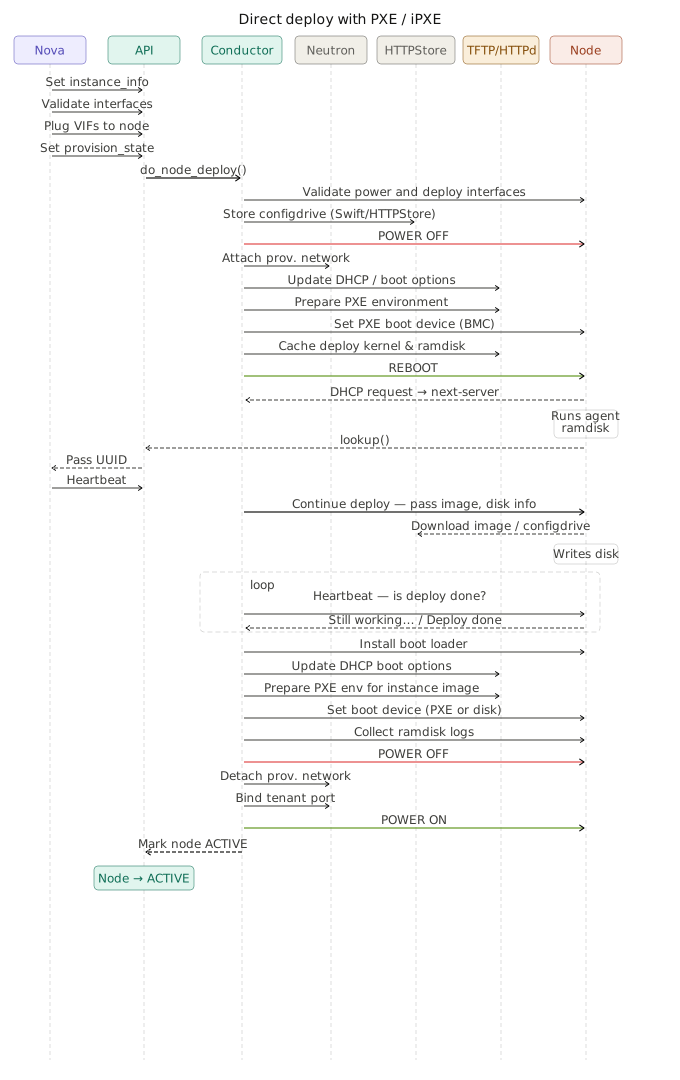
Option A: Enroll A Node With PXE Or IPXE Boot
PXE is the standard network boot path for hardware that supports network booting. In this model, the node downloads boot artifacts over the provisioning network.
Create The Node
This example uses the redfish driver, Redfish-based management, and the ipxe boot interface.
node=123456-compute1
node_mac="aa:bb:cc:dd:ee:ff" # MAC address of PXE interface
node_oob=x.x.x.x # Node ILO/IDRAC address
deploy_aki=ipa-centos9-stable-2026.1-aki
deploy_ari=ipa-centos9-stable-2026.1-ari
resource=GP2_XL
phys_arch=x86_64
phys_cpus=128
phys_ram=720896
phys_disk=960

openstack baremetal node create --driver redfish \
  --boot-interface ipxe \
  --driver-info redfish_username=root \
  --driver-info redfish_password=<REPLACE_WITH_PASSWORD> \
  --driver-info redfish_address=https://${node_oob} \
  --driver-info redfish_verify_ca=False \
  --driver-info redfish_system_id=/redfish/v1/Systems/System.Embedded.1 \
  --driver-info deploy_kernel=$(openstack image show "$deploy_aki" -c id -f value) \
  --driver-info deploy_ramdisk=$(openstack image show "$deploy_ari" -c id -f value) \
  --management-interface redfish \
  --power-interface redfish \
  --property cpus=$phys_cpus \
  --property memory_mb=$phys_ram \
  --property local_gb=$phys_disk \
  --property cpu_arch=$phys_arch \
  --property capabilities='boot_mode:uefi' \
  --resource-class $resource \
  --network-interface flat \
  --name $node

openstack baremetal port create $node_mac \
  --node `openstack baremetal node show $node -c uuid |awk -F "|" '/ uuid  / {print $3}'`

openstack baremetal node validate $node
openstack baremetal node manage $node
openstack baremetal node show $node -c provision_state

openstack baremetal node clean --clean-steps '[{"interface": "deploy", "step": "erase_devices_metadata"}]' $node

openstack baremetal node provide $node
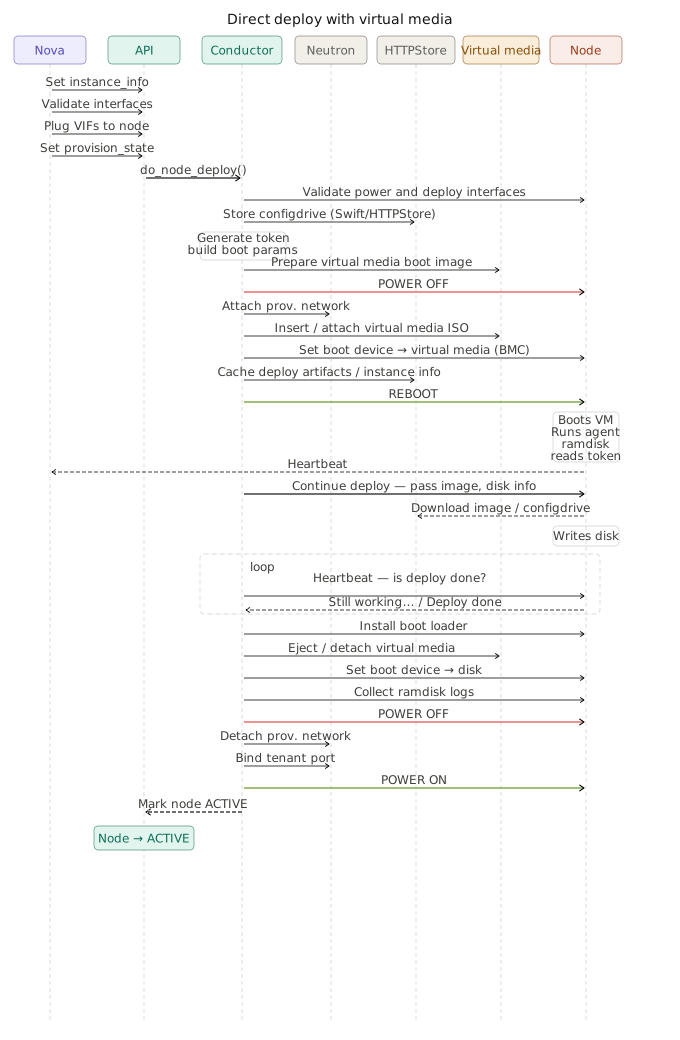
Option B: Enroll A Node With Virtual Media
Virtual media boot uses the server BMC to attach temporary boot media instead of depending on PXE infrastructure. This is commonly used with Redfish-capable hardware and UEFI-based booting.
Even when virtual media is used, the Ironic provisioning network is still required so the deployment ramdisk can communicate with the conductor and supporting services.
Create The Node
This example uses the redfish driver with the redfish-virtual-media boot interface.
node=123456-compute2
node_mac="aa:bb:cc:dd:ee:ff" # MAC address of provisioning interface
node_oob=x.x.x.x # Node ILO/IDRAC address
deploy_aki=ipa-centos9-stable-2026.1-aki
deploy_ari=ipa-centos9-stable-2026.1-ari
deploy_bootloader=ubuntu-noble-esp
resource=GP2_XL
phys_arch=x86_64
phys_cpus=128
phys_ram=720896
phys_disk=960

openstack baremetal node create --driver redfish \
  --driver-info redfish_address=https://${node_oob} \
  --driver-info redfish_username=root \
  --driver-info redfish_password=<REPLACE_WITH_PASSWORD> \
  --driver-info redfish_verify_ca=False \
  --name $node

openstack baremetal node set \
  --boot-interface redfish-virtual-media \
  $node

openstack baremetal node set \
  --driver-info bootloader=$(openstack image show ${deploy_bootloader} -c id -f value) \
  --driver-info deploy_kernel=$(openstack image show "$deploy_aki" -c id -f value) \
  --driver-info deploy_ramdisk=$(openstack image show "$deploy_ari" -c id -f value) \
  --property cpu_arch=$phys_arch \
  --property cpus=$phys_cpus \
  --property memory_mb=$phys_ram \
  --property local_gb=$phys_disk \
  --property capabilities='boot_mode:uefi' \
  --resource-class $resource \
  $node

openstack baremetal node set --property root_device='{"serial" : "<REPLACE_WITH_DISK_SERIAL>"}' \
  $node

openstack baremetal port create $node_mac \
  --node `openstack baremetal node show $node -c uuid |awk -F "|" '/ uuid  / {print $3}'`

openstack baremetal node validate $node
openstack baremetal node manage $node
openstack baremetal node show $node -c provision_state

openstack baremetal node clean --clean-steps '[{"interface": "deploy", "step": "erase_devices_metadata"}]' $node

openstack baremetal node provide $node
Verify Node Availability
After enrollment, confirm that the bare metal node is visible in both Nova and Ironic. The node UUID shown in Nova should match the Ironic node UUID.
openstack hypervisor list |grep -v QEMU
+--------------------------------------+--------------------------------------+-----------------+--------------+-------+
| ID                                   | Hypervisor Hostname                  | Hypervisor Type | Host IP      | State |
+--------------------------------------+--------------------------------------+-----------------+--------------+-------+
| c260f8ae-ece5-4969-8bb4-3a1da7824578 | c260f8ae-ece5-4969-8bb4-3a1da7824578 | ironic          | None         | up    |
| a581f3cb-116b-43ff-b4f0-eb781f5550e9 | a581f3cb-116b-43ff-b4f0-eb781f5550e9 | ironic          | None         | up    |
+--------------------------------------+--------------------------------------+-----------------+--------------+-------+

openstack baremetal node list
+--------------------------------------+-----------------+---------------+-------------+--------------------+-------------+
| UUID                                 | Name            | Instance UUID | Power State | Provisioning State | Maintenance |
+--------------------------------------+-----------------+---------------+-------------+--------------------+-------------+
| c260f8ae-ece5-4969-8bb4-3a1da7824578 | 123456-compute1 | None          | power off   | available          | False       |
| a581f3cb-116b-43ff-b4f0-eb781f5550e9 | 123456-compute2 | None          | power off   | available          | False       |
+--------------------------------------+-----------------+---------------+-------------+--------------------+-------------+
Once the provisioning state is available, the node can be scheduled for deployment.
Create A Bare Metal Server
Bare metal nodes frequently exceed default project quotas. Update quota values before creating an instance to avoid scheduling failures.
openstack quota set --cores -1 --ram -1 --instances 100 `openstack project show admin -c id -f value`

openstack server create \
  --flavor GP2.XL \
  --image ubuntu-noble-metal-1 \
  --use-config-drive \
  --key-name "<key_name>" \
  --hint query='["=", "$hypervisor_hostname", "<baremetal_node_UUID>"]' \
  --network baremetal-provisioning-network \
  $node

openstack server list
+--------------------------------------+-----------------------+--------+-----------------------------------------------+----------------------+-----------+
| ID                                   | Name                  | Status | Networks                                      | Image                | Flavor    |
+--------------------------------------+-----------------------+--------+-----------------------------------------------+----------------------+-----------+
| c3f40ae6-b6ec-4c5d-a6e2-2e09cdfa1f7c | 123456-compute1       | ACTIVE | baremetal-provisioning-network=172.29.233.33  | ubuntu-noble-metal-1 | GP2.XL    |
| f55b4119-528a-41c3-8907-956047cb6854 | 123456-compute2       | ACTIVE | baremetal-provisioning-network=172.29.234.61  | ubuntu-noble-metal-1 | GP2.XL    |
+--------------------------------------+-----------------------+--------+-----------------------------------------------+----------------------+-----------+
The scheduler hint shown in the example command is used to target a specific bare metal host.
References
- Drivers, hardware types, and hardware interfaces for Ironic
- Enabling drivers and hardware types
- Boot interface
- Bare Metal service features
- Configuration and operation
- Architecture and implementation details
- Create flavors
- Deploying with Bare Metal service
- Enrolling hardware with Ironic
- Networking with the Baremetal service