Deploy Freezer
Freezer is a disaster recovery and backup-as-a-service component for OpenStack. It provides a way to back up various resources, such as virtual machine instances, databases, and file systems.
It allows users to schedule backups, restore data, and manage the lifecycle of their backups to ensure data protection and business continuity within an OpenStack cloud.
This document outlines the deployment of OpenStack Freezer-Api, Freezer-Agent and Freezer-Scheduler using Genestack.
Freezer Architecture
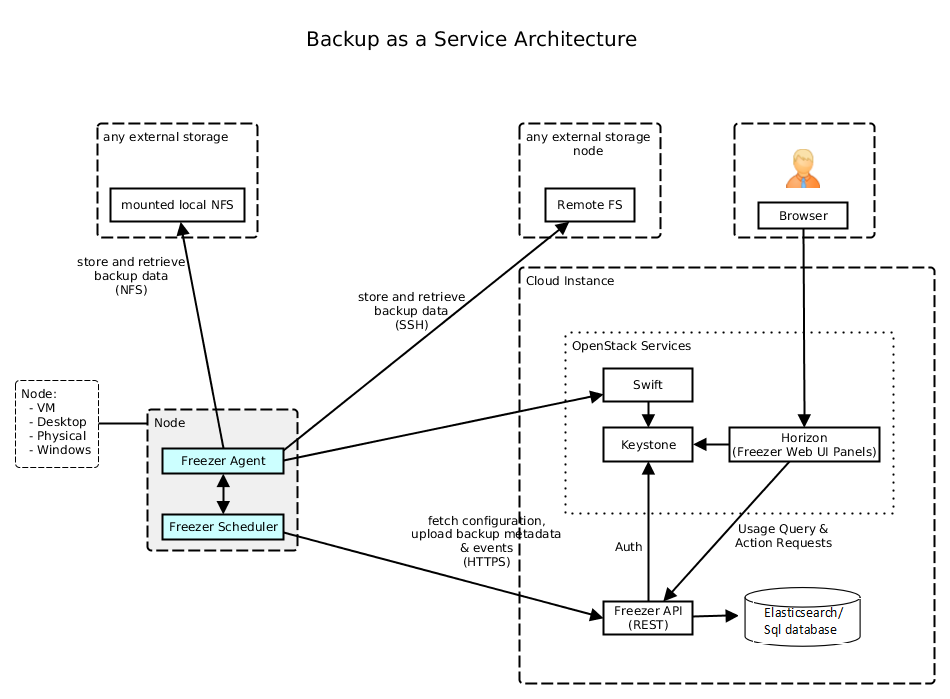
Unlike typical OpenStack services, only the freezer-api resides and runs in the OpenStack cluster. The freezer-agent and freezer-scheduler run outside the cluster. The user can deploy freezer-agent and scheduler on VM/Baremetal etc. making it act as a dedicated Freezer-Client.
Installing Freezer API
Tip
Login to your flex openstack cluster
Create secrets
Information about the secrets used
Service secrets are managed idempotently by this service's install script. The installer creates any missing Kubernetes secrets and reuses existing values.
Run the package deployment
Run the Freezer deployment Script /opt/genestack/bin/install-freezer.sh
#!/bin/bash
# Description: Fetches the version for SERVICE_NAME_DEFAULT from the specified
# YAML file and executes a helm upgrade/install command with dynamic values files.

# Disable SC2124 (unused array), SC2145 (array expansion issue), SC2294 (eval)
# shellcheck disable=SC2124,SC2145,SC2294

# Service
# The service name is used for both the release name and the chart name.
SERVICE_NAME_DEFAULT="freezer"
SERVICE_NAMESPACE="openstack"

# Helm
HELM_REPO_NAME_DEFAULT="openstack-helm"
HELM_REPO_URL_DEFAULT="https://tarballs.opendev.org/openstack/openstack-helm"

# Base directories provided by the environment
GENESTACK_BASE_DIR="${GENESTACK_BASE_DIR:-/opt/genestack}"
GENESTACK_OVERRIDES_DIR="${GENESTACK_OVERRIDES_DIR:-/etc/genestack}"

# Common secret helpers. Missing secrets are generated in Kubernetes and
# existing secrets are never overwritten.
# shellcheck source=helpers.sh
source "${GENESTACK_BASE_DIR}/bin/helpers.sh"
trap cleanup_tmp EXIT

# Define service-specific override directories based on the framework
SERVICE_BASE_OVERRIDES="${GENESTACK_BASE_DIR}/base-helm-configs/${SERVICE_NAME_DEFAULT}"
SERVICE_CUSTOM_OVERRIDES="${GENESTACK_OVERRIDES_DIR}/helm-configs/${SERVICE_NAME_DEFAULT}"

# Define the Global Overrides directory used in the original script
GLOBAL_OVERRIDES_DIR="${GENESTACK_OVERRIDES_DIR}/helm-configs/global_overrides"

# Read the desired chart version from VERSION_FILE
VERSION_FILE="${GENESTACK_OVERRIDES_DIR}/helm-chart-versions.yaml"

if [ ! -f "$VERSION_FILE" ]; then
    echo "Error: helm-chart-versions.yaml not found at $VERSION_FILE" >&2
    exit 1
fi

# Extract version dynamically using the SERVICE_NAME_DEFAULT variable
SERVICE_VERSION=$(grep "^[[:space:]]*${SERVICE_NAME_DEFAULT}:" "$VERSION_FILE" | sed "s/.*${SERVICE_NAME_DEFAULT}: *//")

if [ -z "$SERVICE_VERSION" ]; then
    echo "Error: Could not extract version for '$SERVICE_NAME_DEFAULT' from $VERSION_FILE" >&2
    exit 1
fi

echo "Found version for $SERVICE_NAME_DEFAULT: $SERVICE_VERSION"

# Load chart metadata from custom override YAML if defined
for yaml_file in "${SERVICE_CUSTOM_OVERRIDES}"/*.yaml; do
    if [ -f "$yaml_file" ]; then
        HELM_REPO_URL=$(yq eval '.chart.repo_url // ""' "$yaml_file")
        HELM_REPO_NAME=$(yq eval '.chart.repo_name // ""' "$yaml_file")
        SERVICE_NAME=$(yq eval '.chart.service_name // ""' "$yaml_file")
        break  # use the first match and stop
    fi
done

# Fallback to defaults if variables not set
: "${HELM_REPO_URL:=$HELM_REPO_URL_DEFAULT}"
: "${HELM_REPO_NAME:=$HELM_REPO_NAME_DEFAULT}"
: "${SERVICE_NAME:=$SERVICE_NAME_DEFAULT}"


# Determine Helm chart path
if [[ "$HELM_REPO_URL" == oci://* ]]; then
    # OCI registry path
    HELM_CHART_PATH="$HELM_REPO_URL/$HELM_REPO_NAME/$SERVICE_NAME"
else
    # --- Helm Repository and Execution ---
    helm repo add --force-update "$HELM_REPO_NAME" "$HELM_REPO_URL" 2>/dev/null || true
    helm repo update
    HELM_CHART_PATH="$HELM_REPO_NAME/$SERVICE_NAME"
fi


# Debug output
echo "[DEBUG] HELM_REPO_URL=$HELM_REPO_URL"
echo "[DEBUG] HELM_REPO_NAME=$HELM_REPO_NAME"
echo "[DEBUG] SERVICE_NAME=$SERVICE_NAME"
echo "[DEBUG] HELM_CHART_PATH=$HELM_CHART_PATH"

# Prepare an array to collect -f arguments
overrides_args=()

# Include all YAML files from the BASE configuration directory
# NOTE: Files in this directory are included first.
if [[ -d "$SERVICE_BASE_OVERRIDES" ]]; then
    echo "Including base overrides from directory: $SERVICE_BASE_OVERRIDES"
    for file in "$SERVICE_BASE_OVERRIDES"/*.yaml; do
        # Check that there is at least one match
        if [[ -e "$file" ]]; then
            echo " - $file"
            overrides_args+=("-f" "$file")
        fi
    done
else
    echo "Warning: Base override directory not found: $SERVICE_BASE_OVERRIDES"
fi

# Include all YAML files from the GLOBAL configuration directory
# NOTE: Files here override base settings and are applied before service-specific ones.
if [[ -d "$GLOBAL_OVERRIDES_DIR" ]]; then
    echo "Including global overrides from directory: $GLOBAL_OVERRIDES_DIR"
    for file in "$GLOBAL_OVERRIDES_DIR"/*.yaml; do
        if [[ -e "$file" ]]; then
            echo " - $file"
            overrides_args+=("-f" "$file")
        fi
    done
else
    echo "Warning: Global override directory not found: $GLOBAL_OVERRIDES_DIR"
fi

# Include all YAML files from the custom SERVICE configuration directory
# NOTE: Files here have the highest precedence.
if [[ -d "$SERVICE_CUSTOM_OVERRIDES" ]]; then
    echo "Including overrides from service config directory:"
    for file in "$SERVICE_CUSTOM_OVERRIDES"/*.yaml; do
        if [[ -e "$file" ]]; then
            echo " - $file"
            overrides_args+=("-f" "$file")
        fi
    done
else
    echo "Warning: Service config directory not found: $SERVICE_CUSTOM_OVERRIDES"
fi

echo

# Collect all --set arguments, executing commands and quoting safely
# Collect secret-backed --set arguments from bin/services/${SERVICE_NAME_DEFAULT}.yaml.
collect_service_secret_set_args "$SERVICE_NAME_DEFAULT"
set_args=("${SECRET_HELM_SET_ARGS[@]}")


helm_command=(
    helm upgrade --install "$SERVICE_NAME_DEFAULT" "$HELM_CHART_PATH"
    --version "${SERVICE_VERSION}"
    --namespace="$SERVICE_NAMESPACE"
    --timeout 120m
    --create-namespace

    "${overrides_args[@]}"
    "${set_args[@]}"

    # Post-renderer configuration
    --post-renderer "$GENESTACK_OVERRIDES_DIR/kustomize/kustomize.sh"
    --post-renderer-args "$SERVICE_NAME_DEFAULT/overlay"

    "$@"
)

echo "Executing Helm command (arguments are quoted safely):"
printf '%q ' "${helm_command[@]}"
echo

# Execute the command directly from the array
"${helm_command[@]}"
Validate Install Success
kubectl get pods -n openstack | grep -i freezer
freezer-api-5b8fcbcf8b-g6z6h               1/1     Running     0              3m54s
freezer-api-5b8fcbcf8b-rbx4r               1/1     Running     0              4m9s
freezer-api-5b8fcbcf8b-zc9c7               1/1     Running     0              3m54s
freezer-db-sync-l7mnh                      0/1     Completed   0              4m9s
freezer-ks-endpoints-bz6t5                 0/3     Completed   0              3m32s
freezer-ks-service-jxgp7                   0/1     Completed   0              3m52s
freezer-ks-user-tqqqt                      0/1     Completed   0              2m54s

kubectl get configmaps -n openstack | grep -i freezer
freezer-bin                      7      4m35s

kubectl get secrets -n openstack | grep freezer
freezer-admin                                                    Opaque               1      6d9h
freezer-db-admin                                                 Opaque               1      4m45s
freezer-db-password                                              Opaque               1      6d9h
freezer-db-user                                                  Opaque               1      4m45s
freezer-etc                                                      Opaque               4      4m45s
freezer-keystone-admin                                           Opaque               9      4m45s
freezer-keystone-service-password                                Opaque               1      6d9h
freezer-keystone-test-password                                   Opaque               1      6d9h
freezer-keystone-user                                            Opaque               9      4m45s
sh.helm.release.v1.freezer.v1                                    helm.sh/release.v1   1      4m45s

kubectl get service -n openstack | grep -i freezer
freezer-api                 ClusterIP      10.x.x.x   <none>        9090/TCP
Installing Freezer-Agent and Freezer-Scheduler on Freezer-Client
In this case its assumed that your Freezer-Client is actually a VM which can talk to the openstack api endpoints of your flex cluster.
Note
In this case its assumed Ubuntu OS is the OS of choice on the freezer-client VM. However, it can really be any OS as long as its able to run python, since all freezer-agent code runs inside the virtual environment.
sudo apt-get install python3-dev
sudo apt install python3.12-venv
sudo python3 -m venv freezer-venv
source freezer-venv/bin/activate

pip install pymysql
pip install freezer
Now freezer binaries are available inside the virtual environment.
Create RC file with flex openstack cluster credentials like below example
# ==================== BASIC AUTHENTICATION ====================
export OS_AUTH_URL="https://keystone.cloud.dev/v3"
export OS_USERNAME=admin
export OS_PASSWORD=password
export OS_PROJECT_NAME=admin
export OS_PROJECT_DOMAIN_NAME=default
export OS_USER_DOMAIN_NAME=default

# ==================== API VERSIONS ====================
export OS_IDENTITY_API_VERSION=3

# ==================== ENDPOINT CONFIGURATION ====================
export OS_ENDPOINT_TYPE=publicURL
export OS_REGION_NAME=RegionOne

# ==================== SSL CONFIGURATION ====================
export OS_INSECURE=true
export PYTHONHTTPSVERIFY=0
Warning
Make sure your DNS resolution is able to resolve the public endpoints for freezer service running on your openstack flex cluster.
Create freezer-scheduler.conf file
[DEFAULT]

freezer_endpoint_interface=public

# Logging Configuration (Recommended)
log_file = /var/log/freezer/scheduler.log
log_dir = /var/log/freezer
use_syslog = False

# Client Identification (CRITICAL)
# This ID is used by the API to assign jobs to this specific scheduler instance.
# It's usually set to the VM's hostname.
client_id = freezer-client

# Jobs Directory (Where the scheduler looks for local job definitions - optional)
jobs_dir = /home/ubuntu/freezer-bkp-dir

# API Polling Interval (in seconds)
interval = 60

[keystone_authtoken]
auth_url = https://keystone.cloud.dev/v3
auth_type = password
project_domain_name = Default
user_domain_name = Default
project_name = service
username = freezer
password = freezer-service-password
Start freezer-scheduler
Register Freezer agent
Create client description using json file
While running above command, have a watch on kubectl logs of freezer-api pods in your openstack cluster
sudo kubectl logs -n openstack freezer-api-6849445b5c-7s4cn -f
sudo kubectl logs -n openstack freezer-api-6849445b5c-dqm8n -f
...
2025-10-06 15:43:25.809 1 INFO freezer_api.db.sqlalchemy.api [req-d7f36415-4b7f-4f8f-a36c-1917f117f6f4 - - - - - -]  Client registered, client_id: backup-client-vm
Freezer Use Cases
Create Freezer Jobs
Similar to cronjobs, freezer jobs are an abstraction to schedule specific backups at a pre-defined time.
Create job description temp-job.json:
{
    "description": "Test-0001",
    "job_id": "9999",
    "job_schedule": {
        "schedule_interval": "5 minutes",
        "status": "scheduled",
        "event": "start"
    },
    "job_actions": [
        {
            "max_retries": 5,
            "max_retries_interval": 6,
            "freezer_action": {
                "backup_name": "test0001_backup",
                "container": "test0001_container",
                "no_incremental": true,
                "path_to_backup": "/home/ubuntu/fvenv-orig",
                "log_file": "/home/ubuntu/job-9999.log",
                "snapshot": true,
                "action": "backup",
                "remove_older_than": 365
            }
        }
     ]
}
Create job using this definition
List the jobs
+--------+-------------+-----------+--------+-----------+-------+------------+
| Job ID | Description | # Actions | Result | Status    | Event | Session ID |
+--------+-------------+-----------+--------+-----------+-------+------------+
| 9999   | Test-0001   |         1 |        | scheduled | start |            |
+--------+-------------+-----------+--------+-----------+-------+------------+
Show jobs
+-------------+--------------------------------------------------------------+
| Field       | Value                                                        |
+-------------+--------------------------------------------------------------+
| Job ID      | 9999                                                         |
| Client ID   | backup-client-vm                                             |
| User ID     | e555ac7d0249475dbedf37b7861d1324                             |
| Session ID  |                                                              |
| Description | Test-0001                                                    |
| Actions     | [{'action_id': 'e04dff39eec344a693cd344ada063948',           |
|             |   'freezer_action': {'action': 'backup',                     |
|             |                      'backup_name': 'test0001_backup',       |
|             |                      'container': 'test0001_container',      |
|             |                      'log_file': '/home/ubuntu/job0001.log', |
|             |                      'no_incremental': True,                 |
|             |                      'path_to_backup': '/etc/',              |
|             |                      'remove_older_than': 365,               |
|             |                      'snapshot': True},                      |
|             |   'max_retries': 5,                                          |
|             |   'max_retries_interval': 6,                                 |
|             |   'project_id': '76c5a4cbf1074460bfdcc261340c6cbe',          |
|             |   'user_id': 'e555ac7d0249475dbedf37b7861d1324'}]            |
| Start Date  |                                                              |
| End Date    |                                                              |
| Interval    | 5 minutes                                                    |
| Status      | scheduled                                                    |
| Result      |                                                              |
| Current pid |                                                              |
| Event       | start                                                        |
+-------------+--------------------------------------------------------------+
Update the job with changed log file name and path_to_backup
Create VM backups
VM backups can be created locally (on same freezer-client VM storage) or remotely (in Swift object storage connected to Openstack Cluster)
Backup VM to Local Storage
Backup destination local storage/VM disk. Make a note of the VM UUID which you would like to backup.
freezer-agent \
        --action backup \
        --nova-inst-id 7ee5959f-0039-4f5f-b953-25ef38b1a88e \
        --storage local \
        --container /home/ubuntu/freezer-bkp-qcow/ \
        --backup-name qcow-vm-bkp \
        --mode nova \
        --engine nova --no-incremental true \
        --log-file qcow-vm-bkp.log
Output in TABULAR format
+----------------------+---------------------------------+
|       Property       |              Value              |
+----------------------+---------------------------------+
|  curr backup level   |                0                |
|     fs real path     |               None              |
|    vol snap path     |               None              |
|      client os       |              linux              |
|    client version    |              16.0.0             |
|      time stamp      |            1759828011           |
|        action        |              backup             |
|     always level     |                                 |
|     backup media     |               nova              |
|     backup name      |           qcow-vm-bkp           |
|      container       |  /home/ubuntu/freezer-bkp-qcow/ |
|  container segments  |                                 |
|       dry run        |                                 |
|       hostname       |          freezer-client         |
|    path to backup    |                                 |
|      max level       |                                 |
|         mode         |               nova              |
|       log file       |          qcow-vm-bkp.log        |
|       storage        |              local              |
|        proxy         |                                 |
|     compression      |               gzip              |
|       ssh key        |     /home/ubuntu/.ssh/id_rsa    |
|     ssh username     |                                 |
|       ssh host       |                                 |
|       ssh port       |                22               |
| consistency checksum |                                 |
+----------------------+---------------------------------+
Check local backup directory structure
/home/ubuntu/freezer-bkp-qcow/
├── data
│   └── nova
│       └── freezer-client_demo-hclab-qcow-vm-bkp
│           └── 7ee5959f-0039-4f5f-b953-25ef38b1a88e
│               └── 1759828011
│                   └── 0_1759828011
│                       ├── data
│                       └── engine_metadata
└── metadata
    └── nova
        └── freezer-client_demo-hclab-qcow-vm-bkp
            └── 7ee5959f-0039-4f5f-b953-25ef38b1a88e
                └── 1759828011
                    └── 0_1759828011
                        └── metadata

13 directories, 3 files
Backup QCOW2 image based VMs to Swift
freezer-agent \
        --action backup \
        --nova-inst-id 97dfb7df-1b9b-4848-a7d5-840467af5b66 \
        --storage swift \
        --container freezer-bkp-cirros \
        --backup-name freezer-bkp-cirros \
        --mode nova \
        --engine nova \
        --no-incremental true \
        --log-file freezer-bkp-cirros.log
Restore QCOW2 image based VM from Swift to Openstack Cluster
freezer-agent \
        --action restore \
        --nova-inst-id 97dfb7df-1b9b-4848-a7d5-840467af5b66 \
        --storage swift  \
        --container freezer-bkp-cirros \
        --backup-name freezer-bkp-cirros \
        --mode nova \
        --engine nova \
        --noincremental \
        --log-file freezer-restore-cirros.log
Cinder Volume backup to Swift
freezer-agent \
        --action backup \
        --cinder-vol-id 2453735e-678a-4b4a-8604-b79b55c2cd21 \
        --storage swift \
        --container freezer-bkp-cinder \
        --backup-name freezer-bkp-cinder \
        --mode cinder \
        --log-file freezer-bkp-cinder.log
Cinder Volume restore from Swift to Openstack Cluster
freezer-agent \
        --action restore \
        --mode cinder \
        --cinder-vol-id 2453735e-678a-4b4a-8604-b79b55c2cd21 \
        --storage swift \
        --container freezer-bkp-cinder \
        --backup-name freezer-bkp-cinder \
        --log-file freezer-restore-cinder.log
MongoDB backup to Swift
In this case, mongoDB's LVM (where mongoDB LVM volume is mounted) is backed up.
MongoDB operations
Make sure you quiesce any DB operations by stopping the mongodb service momentarily and then restarting it once the backup is completed.
Running Freezer commands
Freezer commands can only be run from inside the virtual environment.
sudo systemctl stop mongod
sudo systemctl status mongod

freezer-agent \
        --action backup \
        --lvm-srcvol /dev/mongo/mongo-1 \
        --lvm-volgroup mongo \
        --lvm-snapsize 2G \
        --lvm-snap-perm ro \
        --lvm-dirmount /tmp/lvm-snapshot-backup  \
        --path-to-backup /tmp/lvm-snapshot-backup \
        --storage swift \
        --container mongo-bkp-lvm \
        --backup-name mongo-bkp-lvm \
        --log-file mongo-bkp-lvm.log

sudo systemctl start mongod
sudo systemctl status mongod
MongoDB restore from Swift
Restore operation involves quiescing mongoDB operations by stopping the mongodb service momentarily and then restarting it once the backup is completed.
sudo systemctl stop mongod
sudo systemctl status mongod

mkdir -p /tmp/mongodb-restore

# Restore timestamp can be fetched by querying the swift objects in the backup container like below.
# Swift authenticates using the S3 credentials available on Freezer-client VM.

swift list --lh freezer-bkp-mongo-lvm

# Note the timestamp of the first object in the container.

freezer-agent \
        --action restore \
        --mode mongo \
        --restore-from-date "2026-01-20T07:43:59" \
        --restore-abs-path /tmp/mongodb-restore  \
        --storage swift \
        --container freezer-bkp-mongo-lvm \
        --backup-name freezer-bkp-mongo-lvm \
        --encrypt-pass-file /home/ubuntu/mongo-test/encryption-key.txt \
        --log-file freezer-bkp-mongo-lvm-rstr.log

sudo rsync -a /tmp/mongodb-restore/ /var/lib/mongodb/
sudo chown -R mongodb:mongodb /var/lib/mongodb

sudo systemctl start mongod
sudo systemctl status mongod
MySQL Backup to Swift
In this case MySQL is first backed up locally in a temp location and then backup is uploaded to Swift.
MySQL DB operations
Make sure you quiesce any DB operations by stopping the mysql service momentarily and then restarting it once the backup is completed.
sudo systemctl stop mysql
sudo systemctl status mysql

mkdir -p /tmp/mysql-backup

freezer-agent \
        --action backup \
        --mode mysql \
        --mysql-conf /etc/mysql/conf.d/backup.cnf \
        --path-to-backup /tmp/mysql-backup \
        --storage swift \
        --container freezer-bkp-mysql \
        --backup-name freezer-bkp-mysql \
        --log-file freezer-bkp-mysql.log

sudo rsync -a /tmp/mysql-backup/ /var/lib/mysql/
sudo chown -R mysql:mysql /var/lib/mysql

sudo systemctl start mysql.service
sudo systemctl status mysql.service
MySQL Restore from Swift
Restore operation involves quiescing MySQL operations by stopping the mysql service momentarily and then restarting it once the restore is completed.
About Swift
- Restore timestamp can be fetched by querying the swift objects in the backup container like below.
- Swift authenticates using the S3 credentials available on Freezer-client VM.
sudo systemctl stop mysql
sudo systemctl status mysql

mkdir -p /tmp/mysql-restore

swift list --lh freezer-bkp-mysql

# Note the timestamp of the first object in the container.

freezer-agent \
        --action restore \
        --mode mysql \
        --mysql-conf /etc/mysql/conf.d/backup.cnf \
        --restore-from-date "2026-01-16T08:15:22" \
        --restore-abs-path /tmp/mysql-restore \
        --storage swift \
        --container freezer-bkp-mysql \
        --backup-name freezer-bkp-mysql \
        --log-file freezer-bkp-mysql.log

sudo rsync -a /tmp/mysql-restore/ /var/lib/mysql/
sudo chown -R mysql:mysql /var/lib/mysql

sudo systemctl start mysql.service
sudo systemctl status mysql.service
Filesystem Backup to Swift
Local filesystem directory / files can be backed up to swift object store.
freezer-agent \
        --action backup \
        --mode fs \
        --path-to-backup /home/ubuntu/freezer-git-repo/freezer/ \
        --storage swift \
        --container freezer-bkp-fs \
        --backup-name freezer-bkp-fs \
        --compression gzip \
        --log-file freezer-bkp-fs.log
Creating Sessions
A session acts as a high-level container that groups related backup and restore actions. It provides a unique identifier and metadata that applies to all jobs executed within it.
When you create a job, you typically want that job's executions to be tied to a specific session. This makes management easier, especially during recovery, as you can see all backup runs related to a single project or time period under one session ID.
-
Create a session config file on the Freezer Client.
-
Register the session:
Session c6a7fcfd06134b788f0a34e8454174b1 created +----------------------------------+---------------------------------+--------+--------+--------+ | Session ID | Description | Status | Result | # Jobs | +----------------------------------+---------------------------------+--------+--------+--------+ | c6a7fcfd06134b788f0a34e8454174b1 | Local Storage VM Backup Session | active | None | 0 | +----------------------------------+---------------------------------+--------+--------+--------+ -
Note the session-id from above. Add an existing job to this session (job-id's are arbitrary):
-
Start a session with a specific job (job-* are arbitrary):
Backup Retention Policy
Freezer backups stored in Swift can accumulate over time. The swift_retention_policy.py
script automates object expiration and container cleanup for Freezer backup containers.
Location
The script is located at scripts/freezer_retention/swift_retention_policy.py
in the Genestack repository.
Note
This script has only been tested with Freezer backup containers created in Swift, but should work with any S3 compatible containers and objects.
Prerequisites
Quick Start
All available options
Time Options:
  -s, --seconds N           Delete after N seconds
  -m, --minutes N           Delete after N minutes
  -H, --hours N             Delete after N hours
  -d, --days N              Delete after N days
  -M, --months N            Delete after N months
  -t, --delete-at UNIX      Delete at specific timestamp

Cleanup Options:
  --cleanup                 Monitor and delete containers when empty
  --check-interval SECONDS  Seconds between checks (default: 60)
  --max-wait SECONDS        Maximum time to wait (default: 3600)

Other Options:
  --dry-run                 Show what would be done
  -v, --verbose             Verbose output
How It Works
The script operates in two phases:
- Sets
X-Delete-Atheaders on all objects in the specified containers - Monitors containers and automatically deletes them once empty (when
--cleanupis used)
| Container Status | Description | Auto-Delete? |
|---|---|---|
empty |
No objects remaining | Yes |
not_found |
Container does not exist | N/A |
has_permanent_objects |
Objects without X-Delete-At |
No |
waiting_for_expiration |
Objects not yet past expiry | No |
waiting_for_expirer |
Expired but not yet removed by Swift | No |
Recommended check intervals
| Expiration Window | Check Interval |
|---|---|
| < 10 minutes | 30-60 seconds |
| 1-24 hours | 5-15 minutes |
| > 1 day | 30-60 minutes |
Set a max wait time
Prevent the script from running indefinitely:
For full documentation and troubleshooting, see
scripts/freezer_retention/README.md.